7.7. Accessing the block(s)
The data in a UniTensor is stored in blocks. We introduce how to access and manipulate these. This way, the data of a UniTensor can be accessed and manipulated. Each block is a Tensor.
7.7.1. UniTensor without symmetries
A UniTensor without symmetries is simply a Tensor with labeled bonds. In this case, the methods .get_block() and .get_block_() return the Tensor object of the UniTensor for us to manipulate.
In Python:
1# Create an UniTensor from Tensor
2T = cytnx.UniTensor(cytnx.ones([3,3]))
3print(T.get_block())
Output >>
Total elem: 9
type  : Double (Float64)
cytnx device: CPU
Shape : (3,3)
[[1.00000e+00 1.00000e+00 1.00000e+00 ]
 [1.00000e+00 1.00000e+00 1.00000e+00 ]
 [1.00000e+00 1.00000e+00 1.00000e+00 ]]
Note
While .get_block_() returns a reference to the Tensor which corresponds to the data in a UniTensor, .get_block() makes a copy of the data. Therefore, changes to a Tensor returned from .get_block_() will also change the UniTesor data, while changes after a .get_block() do not affect the UniTensor.
7.7.2. UniTensor with symmetries
Let’s use the same example of a UniTensor with U1 symmetry that we introduced in the previous section UniTensor with Symmetries to demonstrate how to get block(s) from a block structured UniTensor:
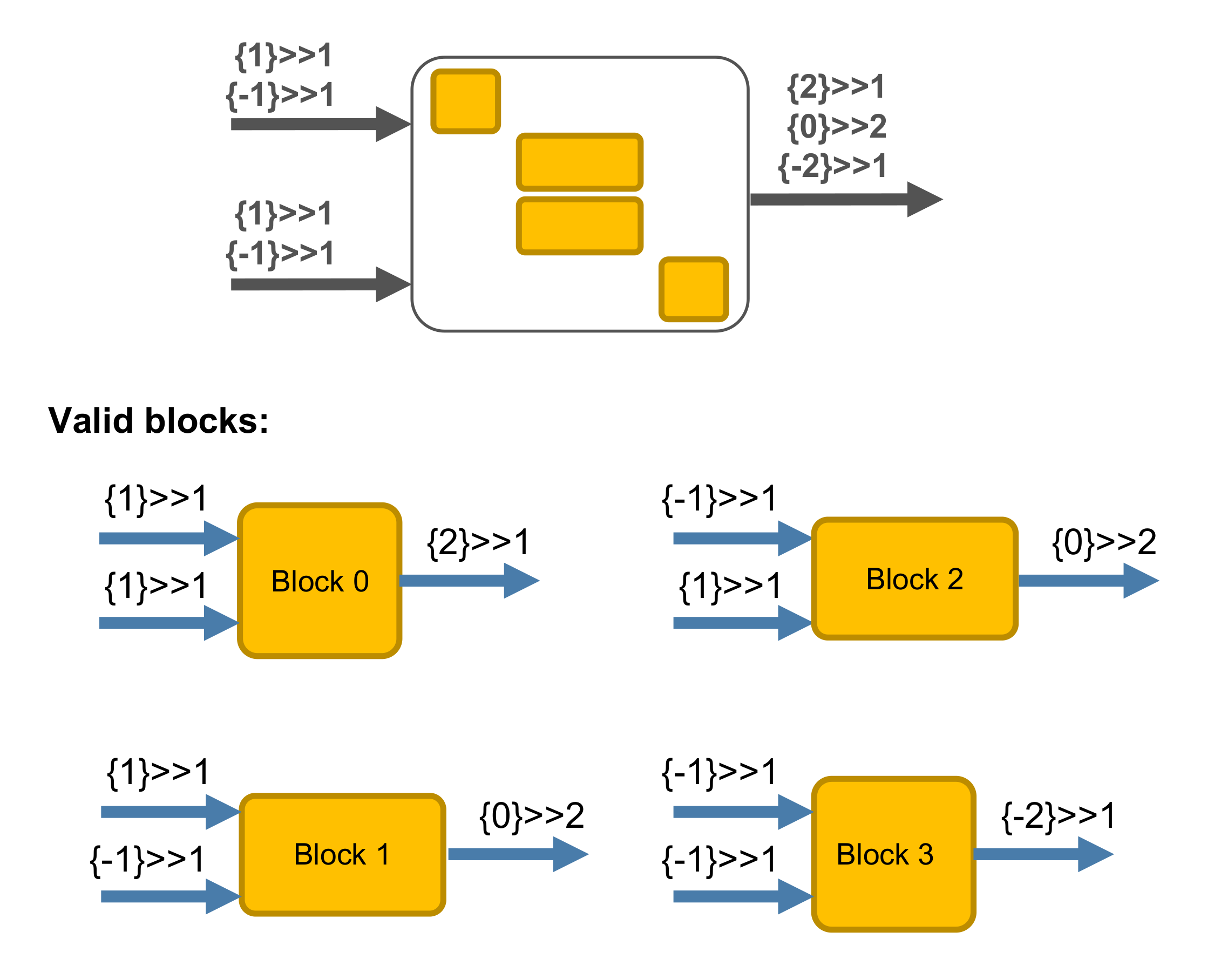
In Python:
 1bond_d = cytnx.Bond(
 2    cytnx.BD_IN,
 3    [cytnx.Qs(1)>>1, cytnx.Qs(-1)>>1],
 4    [cytnx.Symmetry.U1()])
 5
 6bond_e = cytnx.Bond(
 7    cytnx.BD_IN,
 8    [cytnx.Qs(1)>>1, cytnx.Qs(-1)>>1],
 9    [cytnx.Symmetry.U1()])
10
11bond_f = cytnx.Bond(
12    cytnx.BD_OUT,
13    [cytnx.Qs(2)>>1, cytnx.Qs(0)>>2,
14     cytnx.Qs(-2)>>1],
15    [cytnx.Symmetry.U1()])
16
17Tsymm = cytnx.UniTensor([bond_d, bond_e, bond_f],
18                        name="symm. tensor",
19                        labels=["d","e","f"])
There are two ways to get a certain block from a UniTensor.
1. Getting a block by its quantum number indices
- UniTensor.get_block(qindices)
- Parameters:
qindices (List[int]) – list of integers specifying the indices of the quantum numbers on each bond
The quantum number indices (qindices) need to be given in the same order as the legs in the tensor. In our example, bond_f was created with three quantum numbers. Their indices are
0 for U1(2)
1 for U1(0)
2 for U1(-2)
because the quantum numbers were created in this order. Similarly for bond_d and bond_e: *U1(1) has quantum number index 0 and U1(-1) has quantum number index 2.
As an example, we want to access the block with quantum numbers [Qs(1),Qs(-1),Qs(0)]. In the above convention, this corresponds to the quantum number indices [0,1,1]:
In Python:
1B1 = Tsymm.get_block_([0,1,1])
2print(B1)
Output >>
Total elem: 2
type  : Double (Float64)
cytnx device: CPU
Shape : (1,1,2)
[[[0.00000e+00 0.00000e+00 ]]]
2. Getting a block by its block index
- UniTensor.get_block(blockindex)
- Parameters:
blockindex ([int]) – the index of the block in the UniTensor
If we know the block index, we can access the data directly. For example, if we want to get the block with block index number 1:
In Python:
1B1 = Tsymm.get_block_(1)
2print(B1)
Output >>
Total elem: 2
type  : Double (Float64)
cytnx device: CPU
Shape : (1,1,2)
[[[0.00000e+00 0.00000e+00 ]]]
Note
The order of the blocks in a UniTensor depends on how the tensor was created. If you want to access blocks with certain quantum number indices, use UniTensor.get_block(qindices).
Getting all blocks:
To access all valid blocks in a UniTensor with block structure (with symmetries), we can use get_blocks() or get_blocks_(). This will return the blocks as a list in Python or a vector in C++. Each block is a cytnx.Tensor object. The order of the blocks corresponds to their block indices.
In Python:
1Blks = Tsymm.get_blocks_()
2print(len(Blks))
3print(*Blks)
Output >>
4

Total elem: 1
type  : Double (Float64)
cytnx device: CPU
Shape : (1,1,1)
[[[0.00000e+00 ]]]


Total elem: 2
type  : Double (Float64)
cytnx device: CPU
Shape : (1,1,2)
[[[0.00000e+00 0.00000e+00 ]]]


Total elem: 2
type  : Double (Float64)
cytnx device: CPU
Shape : (1,1,2)
[[[0.00000e+00 0.00000e+00 ]]]


Total elem: 1
type  : Double (Float64)
cytnx device: CPU
Shape : (1,1,1)
[[[0.00000e+00 ]]]
Note
Note again that .get_block(s)_() returns to the block in the UniTensor, while .get_block(s)() creates an independent copy of the data.
7.7.3. Putting a block
We might want to do some manipulations to an individual block that we got from .get_block(s). Then, the new block can be put back to the UniTensor with put_block().
1. Putting a block into a location assigned by their quantum number indices
- UniTensor.put_block(Tn, qindices)
- Parameters:
qindices (List[int]) – list of integers specifying the indices of quantum numbers on each bond
We can, for example, put the block to the location in the UniTensor with quantum numbers [Qs(1),Qs(-1),Qs(0)], corresponding to quantum number indices [0,1,1]:
In Python:
1B1new = cytnx.ones([1,1,2])
2B1 = Tsymm.get_block_([0,1,1])
3print(B1)
4Tsymm.put_block(B1new,[0,1,1])
5print(Tsymm.get_block_([0,1,1]))
Output >>
Total elem: 2
type  : Double (Float64)
cytnx device: CPU
Shape : (1,1,2)
[[[0.00000e+00 0.00000e+00 ]]]


Total elem: 2
type  : Double (Float64)
cytnx device: CPU
Shape : (1,1,2)
[[[1.00000e+00 1.00000e+00 ]]]
2. Putting a block by its block index
- UniTensor.put_block(Tn, blockindex)
- Parameters:
blockindex ([int]) – the index of the blocks in the UniTensor
For example, if we want to put the tensor to the block with block index 2, then:
In Python:
1B2new = cytnx.ones([1,1,2])
2B2 = Tsymm.get_block_(2)
3print(B2)
4Tsymm.put_block(B2new,2)
5print(Tsymm.get_block_(2))
Output >>
Total elem: 2
type  : Double (Float64)
cytnx device: CPU
Shape : (1,1,2)
[[[0.00000e+00 0.00000e+00 ]]]


Total elem: 2
type  : Double (Float64)
cytnx device: CPU
Shape : (1,1,2)
[[[1.00000e+00 1.00000e+00 ]]]