7.2. Creating a UniTensor
As mentioned in the introduction, a UniTensor consists of Block(s), Bond(s) and label(s). The Block(s) contain the data, while Bond(s) and label(s) are the meta data that describe the properties of the UniTensor.
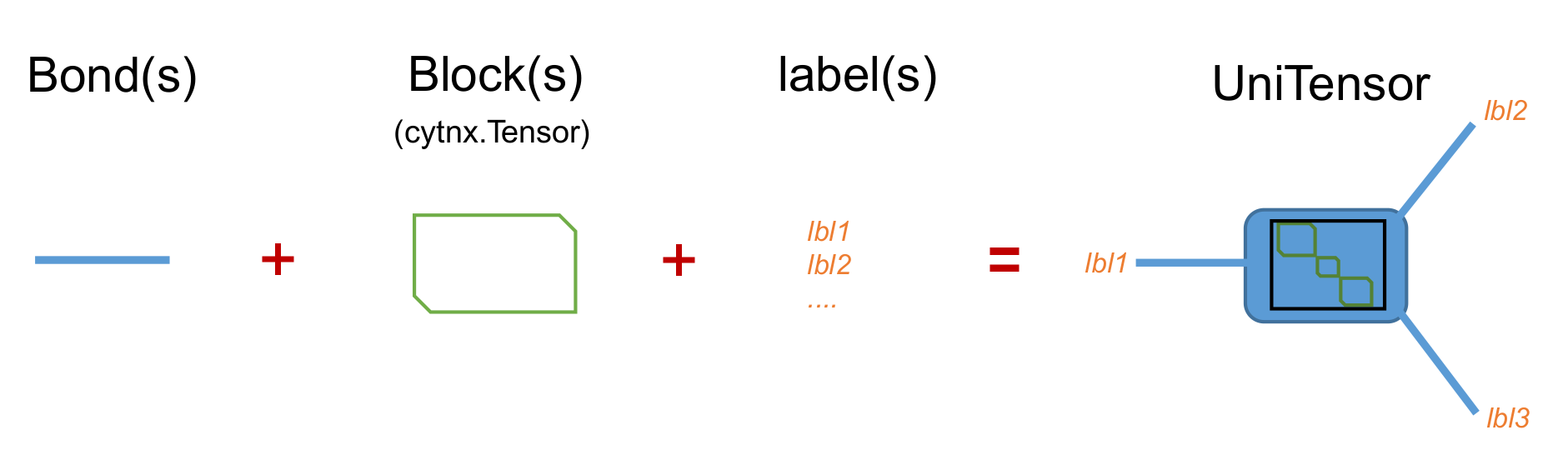
Generally, there are two types of UniTensor types: un-tagged and tagged, depending on whether the Bonds have a direction. In more advanced applications, a UniTensor may have block diagonal or other more complicated structure when symmetries are involved. Therefore, UniTensors can further be categorized into non-symmetric and symmetric (block form):
non-symmetric |
symmetric (block-diagonal) |
|
tagged |
O |
O |
untagged |
O |
X |
In the following, we will explain how to construct a UniTensor.
7.2.1. Constructing from Tensor
Before going into more complicated UniTensor structures, let’s start with the most simple example. For this, we convert a cytnx.Tensor into a UniTensor. This gives us the first type of a UniTensor: an untagged UniTensor.
In the following, we consider a simple rank-3 tensor as an example. The tensor diagram looks like:
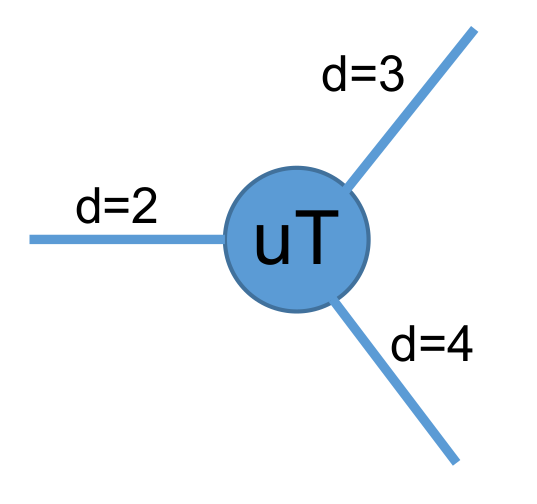
We can convert such a Tensor to a UniTensor:
In Python:
1# create a rank-3 tensor with shape [2,3,4]
2T = cytnx.arange(2*3*4).reshape(2,3,4)
3# convert to UniTensor:
4uT = cytnx.UniTensor(T)
Here, the Tensor T is converted to a UniTensor uT simply by wrapping it with constructor cytnx.UniTensor(). Formally, we can think of this as constructing a UniTensor uT with T being its block (data). If we want to create a UniTensor with different dtype, for example, a complex UniTensor, we can do:
In Python:
1# initialize a tensor with complex data type
2T = cytnx.zeros([2,3,4], dtype=cytnx.Type.ComplexDouble)
3# convert to UniTensor
4uT = cytnx.UniTensor(T)
5# randomize the elements with a uniform distribution in the range [low, high]
6cytnx.random.uniform_(uT, low = -1., high = 1.)
We can use print_diagram() to visualize a UniTensor in a more straightforward way as a diagram:
In Python:
1uT.print_diagram()
Output >>
-----------------------
tensor Name :
tensor Rank : 3
block_form  : False
is_diag     : False
on device   : cytnx device: CPU
          ---------
         /         \
   0 ____| 2     3 |____ 1
         |         |
         |       4 |____ 2
         \         /
          ---------
The information provided by this output is explained in detail in print_diagram(). We see that a UniTensor with the same shape as T was created. The bond labels are set to the default values “0”, “1” and “2”.
7.2.2. From scratch
Next, let’s introduce the complete API for constructing a UniTensor from scratch:
- UniTensor(bonds, labels, rowrank, dtype, device, is_diag)
- Parameters:
bonds (List[cytnx.Bond]) – list of bonds
labels (List[string]) – list of labels associate to each bond
rowrank (int) – rowrank used when flattened into a matrix
dtype (cytnx.Type) – the dtype of the block(s)
device (cytnx.Device) – the device where the block(s) are held
is_diag (bool) – whether the UniTensor is diagonal
The first argument bonds is a list of Bond objects. These correspond to the shape of a cytnx.Tensor where the elements in shape indicate the dimensions of the bonds. Here, each bond is represent by a cytnx.Bond object. In general, cytnx.Bond contains three things:
The dimension of the bond.
The direction of the bond (it can be BD_REG–undirectional, BD_KET (BD_IN)–inward, BD_BRA (BD_OUT)–outward)
The symmetry and the associate quantum numbers.
For more details, see Bond. Here, for simplicity, we will use only the dimension property of a Bond.
Now let’s construct the rank-3 UniTensor with the same shape as in the above example. We assign the three bonds with labels (“a”, “b”, “c”) and also set name to be “uT2 scratch”.
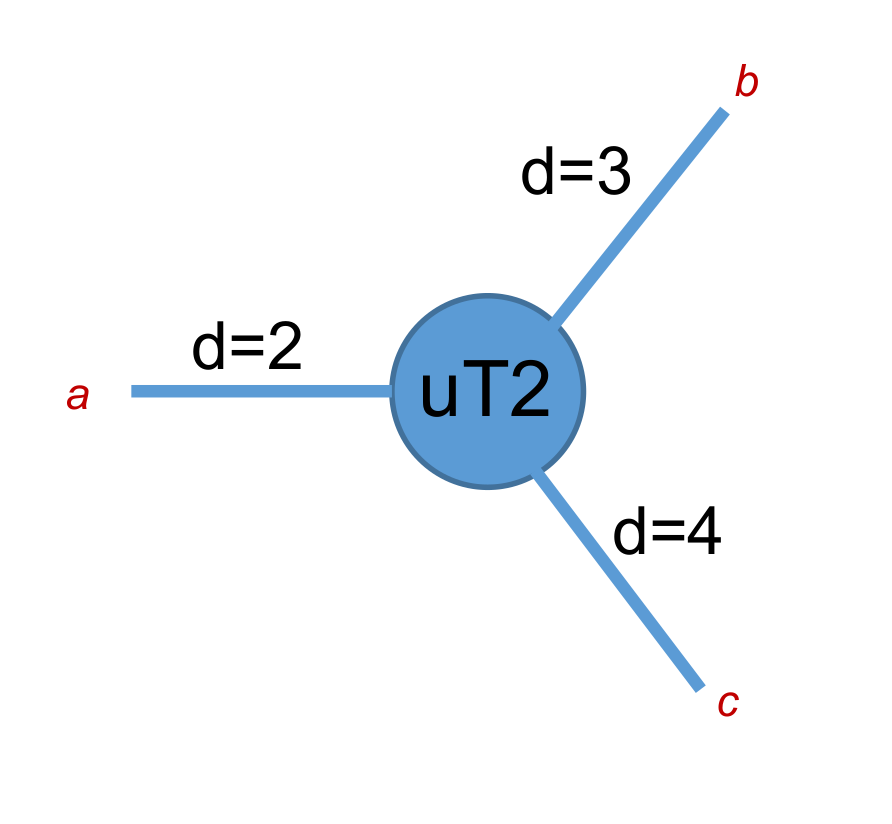
In Python:
1uT2 = cytnx.UniTensor([cytnx.Bond(2),cytnx.Bond(3),cytnx.Bond(4)],labels=["a","b","c"],rowrank=1)
2uT2.set_name("uT2 scratch")
3uT2.print_diagram()
4print(uT2)
Output >>
-----------------------
tensor Name : uT2 scratch
tensor Rank : 3
block_form  : False
is_diag     : False
on device   : cytnx device: CPU
          ---------
         /         \
   a ____| 2     3 |____ b
         |         |
         |       4 |____ c
         \         /
          ---------
-------- start of print ---------
Tensor name: uT2 scratch
is_diag    : False
contiguous : True

Total elem: 24
type  : Double (Float64)
cytnx device: CPU
Shape : (2,3,4)
[[[0.00000e+00 0.00000e+00 0.00000e+00 0.00000e+00 ]
  [0.00000e+00 0.00000e+00 0.00000e+00 0.00000e+00 ]
  [0.00000e+00 0.00000e+00 0.00000e+00 0.00000e+00 ]]
 [[0.00000e+00 0.00000e+00 0.00000e+00 0.00000e+00 ]
  [0.00000e+00 0.00000e+00 0.00000e+00 0.00000e+00 ]
  [0.00000e+00 0.00000e+00 0.00000e+00 0.00000e+00 ]]]
Note
The UniTensor will have all the elements in the block initialized with zeros.
7.2.3. Type conversion
It is possible to convert a UniTensor to a different data type. To convert the data type, simply use UniTensor.astype().
For example, consider a UniTensor A with dtype=Type.Int64, which shall be converted to Type.Double:
In Python:
1A = cytnx.UniTensor(cytnx.ones([3,4],dtype=cytnx.Type.Int64))
2B = A.astype(cytnx.Type.Double)
3print(A.dtype_str())
4print(B.dtype_str())
Output >>
Int64
Double (Float64)
Note
UniTensor.dtype() returns a type-id, while UniTensor.dtype_str() returns the type name.
7.2.4. Transfer between devices
Moving a UniTensor between different devices is very easy. We can use UniTensor.to() to move the UniTensor to a different device.
For example, let’s create a UniTensor in the memory accessible by the CPU and transfer it to the GPU with gpu-id=0.
In Python:
1A = cytnx.UniTensor(cytnx.ones([2,2])) #on CPU
2B = A.to(cytnx.Device.cuda+0)
3print(A) # on CPU
4print(B) # on GPU
5
6A.to_(cytnx.Device.cuda)
7print(A) # on GPU
>> Output:
-------- start of print ---------
Tensor name:
is_diag    : False
contiguous : True

Total elem: 4
type  : Double (Float64)
cytnx device: CPU
Shape : (2,2)
[[1.00000e+00 1.00000e+00 ]
[1.00000e+00 1.00000e+00 ]]


-------- start of print ---------
Tensor name:
is_diag    : False
contiguous : True

Total elem: 4
type  : Double (Float64)
cytnx device: CUDA/GPU-id:0
Shape : (2,2)
[[1.00000e+00 1.00000e+00 ]
[1.00000e+00 1.00000e+00 ]]


-------- start of print ---------
Tensor name:
is_diag    : False
contiguous : True

Total elem: 4
type  : Double (Float64)
cytnx device: CUDA/GPU-id:0
Shape : (2,2)
[[1.00000e+00 1.00000e+00 ]
[1.00000e+00 1.00000e+00 ]]
Note
You can use UniTensor.device() to get the current device-id (cpu = -1), whereas UniTensor.device_str() returns the device name.
UniTensor.to() will return a copy on the target device. If you want to move the current Tensor to another device, use UniTensor.to_() (with underscore).
7.2.5. Tagged UniTensors and UniTensors with Symmetries
The creation of tagged, non-symmetric UniTensors will be explained in Tagged UniTensor. Symmetric UniTensors are discussed in UniTensor with Symmetries.