7.8. Get/set UniTensor element
In this section, we discuss how to get an element directly from a UniTensor and how to set an element. Generally, elements can be accessed by first getting the corresponding block, and then accessing the correct element from that block. However, it is also possible to directly access an element from a UniTensor.
To get an element, one can call UniTensor.at(). It returns a proxy which contains a reference to the element. Furthermore, the proxy can be used to check whether an element corresponds to a valid block in a UniTensor with symmetries.
7.8.1. UniTensor without symmetries
Accessing an element in a UniTensor without symmetries is straightforward by using at
In Python:
1T = cytnx.UniTensor(cytnx.arange(9).reshape(3,3))
2print(T.at([0,2]).value)
In C++:
1auto T = cytnx::UniTensor(cytnx::arange(9).reshape(3, 3));
2print(T.at({0, 2}));
Output >>
2.0
Note
Note that in Python, adding .value is necessary!
The proxy returned by at also serves as reference, so we can directly assign or modify the value:
In Python:
1T = cytnx.UniTensor(cytnx.arange(9).reshape(3,3))
2print(T.at([0,2]).value)
3T.at([0,2]).value = 7
4print(T.at([0,2]).value)
In C++:
1auto T = cytnx::UniTensor(cytnx::arange(9).reshape(3, 3));
2print(T.at({0, 2}));
3T.at({0, 2}) = 7;
4print(T.at({0, 2}));
Output >>
2.0
7.0
7.8.2. UniTensor with symmetries
When a UniTensor has block structure, not all possible elements correspond to a valid block. Invalid elements do not fulfill the symmetries. Therefore, these invalid elements should not be accessed.
In such cases, one can still use at and receive a proxy. The proxy can be used to check if the element is valid.
Let’s consider the same example of a symmetric tensor as in the previous sections:
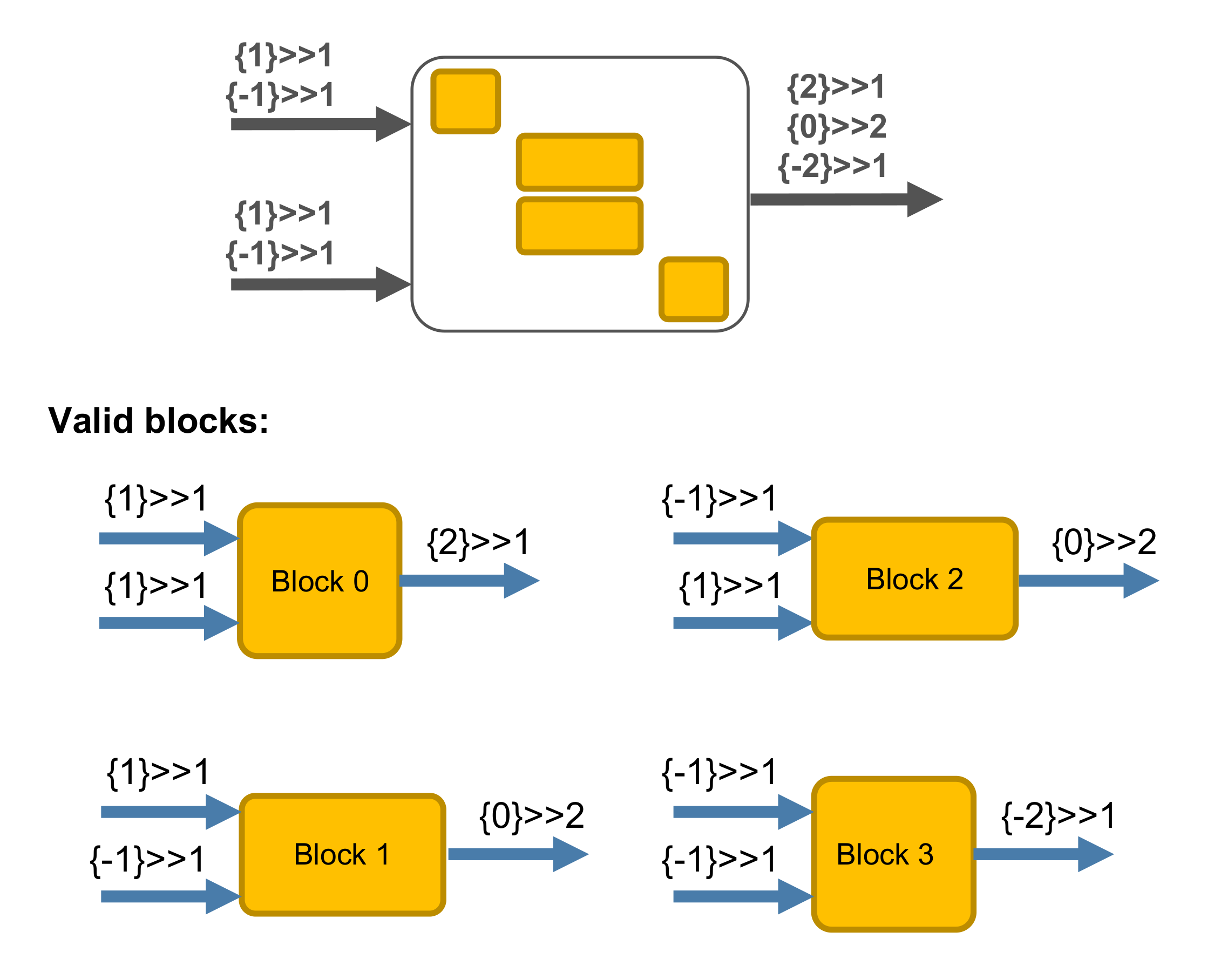
In Python:
 1bond_d = cytnx.Bond(
 2    cytnx.BD_IN,
 3    [cytnx.Qs(1)>>1, cytnx.Qs(-1)>>1],
 4    [cytnx.Symmetry.U1()])
 5
 6bond_e = cytnx.Bond(
 7    cytnx.BD_IN,
 8    [cytnx.Qs(1)>>1, cytnx.Qs(-1)>>1],
 9    [cytnx.Symmetry.U1()])
10
11bond_f = cytnx.Bond(
12    cytnx.BD_OUT,
13    [cytnx.Qs(2)>>1, cytnx.Qs(0)>>2,
14     cytnx.Qs(-2)>>1],
15     [cytnx.Symmetry.U1()])
16
17Tsymm = cytnx.UniTensor([bond_d, bond_e, bond_f],
18                        name="symm. tensor",
19                        labels=["d","e","f"])
An existing element (here: at [0,0,0]) can be accessed as in the case without symmetries:
In Python:
1print(Tsymm.at([0,0,0]).value)
In C++:
1print(Tsymm.at({0,0,0}));
Output >>
0.0
If we try to access an element that does not correspond to a valid block (for example at [0,0,1]), an error is thrown:
In Python:
1print(Tsymm.at([0,0,1]).value)
In C++:
1print(Tsymm.at({0,0,1}));
Output >>
[ERROR] trying access an element that is not exists!, using T.if_exists = sth or checking with T.exists() to verify before access element!
To avoid this error, we can check if the element is valid before accessing it. The proxy provides the method exists() for this purpose. For example, if we want to assign the value 8 to all valid elements with indices of the form [0,0,i], we can use:
In Python:
1for i in [0,1]:
2    tmp = Tsymm.at([0,0,i])
3    if(tmp.exists()):
4        tmp.value = 8.
In C++:
1for(auto i=0;i<2;i++){
2    auto tmp = Tsymm.at({0,0,i});
3    if(tmp.exists()):
4        tmp = 8;
5}
This will set the element at [0,0,0] to 8 while ignoring the [0,0,1] element that does not exist.